





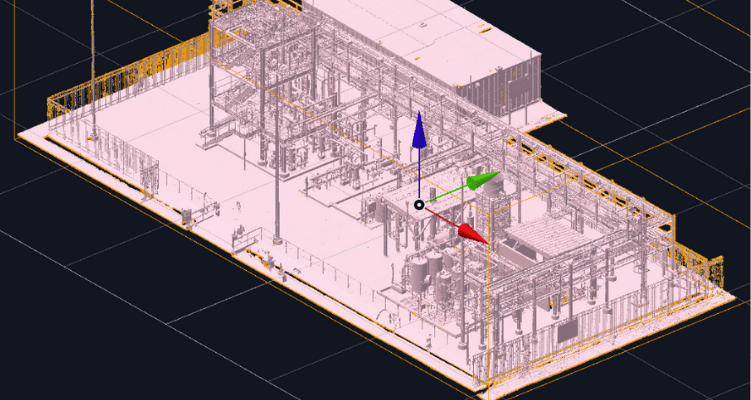
A digital twin is a live, accurate 3D replica of a physical space or asset, built from real-world scan data and kept up to date as that space changes.
Not a rendering. Not a CAD model someone drew from memory. A digital twin starts from what is actually there, captured with a scanner, and stays tied to that reality over time.
That definition matters because the term has been stretched thin. Marketing decks use “digital twin” for everything from a static 3D tour to a full physics simulation. If you manage a plant, a substation, or a production line, the difference between those things is the difference between a nice picture and a tool your team actually uses.
This guide sorts out what a digital twin really is, how one gets built, and where it earns its keep.
Digital twin, defined without the buzzwords
Strip away the hype and a digital twin has three ingredients:
- A real capture. Laser scanning, LiDAR, SLAM, drone photogrammetry, or 360° video, run over the physical space to record it as it actually exists, not as the drawings say it should exist.
- A structured 3D model. The raw capture, usually a point cloud, gets processed into a navigable mesh that a browser can render without a specialized viewer or a beefy workstation.
- A live link to the facility. Equipment IDs, maintenance records, CAD overlays, and CMMS or ERP data get tied to their real spatial location, and the model gets refreshed as the facility changes.
Drop any one of those three and you have something else. A rendering with no real capture is a concept, not a twin. A point cloud with no structure is a dataset nobody outside the survey team can open. A one-time scan with no update path is a snapshot, useful for a single project and stale six months later.
How to build a digital twin
The workflow behind every credible digital twin follows the same four stages, whether the site is a food plant or an offshore vessel.
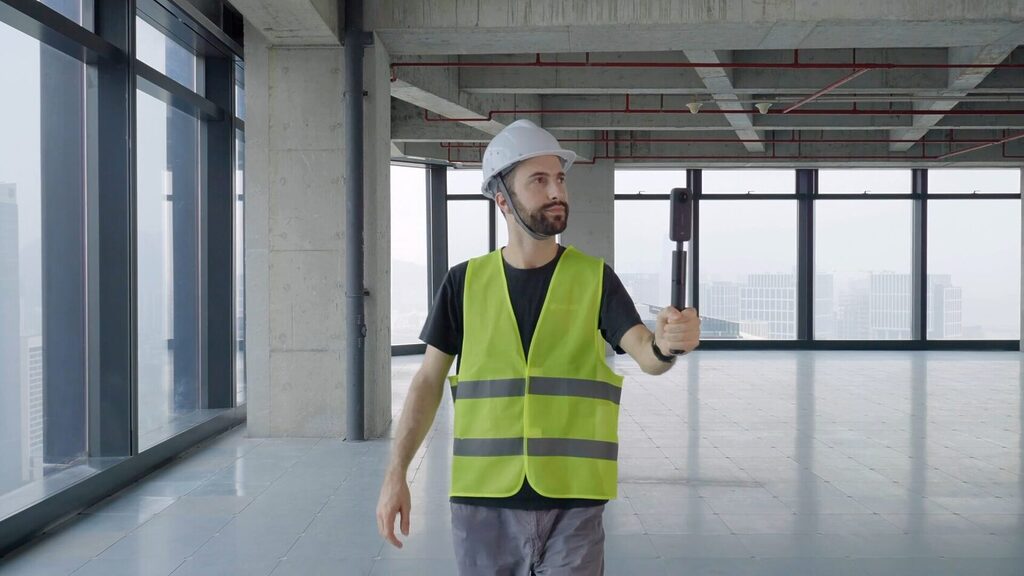
- Capture. A scanner (terrestrial laser scanner, handheld SLAM device, or drone) sweeps the site and generates a dense point cloud, millions of measured points, each with a precise position in space.
- Process. Cloud compute turns that raw point cloud into an optimized mesh, converting a dataset too heavy for most software to open into something a browser can stream.
- Structure. The model gets tagged: equipment names, asset IDs, maintenance notes, links back to CAD or BIM. This is what turns a pretty 3D scene into something operations, engineering, and maintenance teams can each use for their own purpose.
- Maintain. New scans or data inputs update the twin as the facility changes, so the model stays a source of truth instead of drifting into an “as-designed” fiction.
Teams sitting on terabytes of laser scans, LiDAR, and photogrammetry that nobody can open are usually stuck between steps one and two. That gap, structured usable data versus raw unstructured files, is worth understanding on its own, and is covered in more depth in the breakdown of structured, unified, and unstructured scan data.
What a digital twin is not
Three things get called digital twins that are not quite the real thing, and knowing the difference will save a procurement headache.
- A 3D model. A CAD model represents design intent. A digital twin represents as-built reality. They can and should overlay each other, but they answer different questions: one shows what was planned, the other shows what exists.
- A one-time virtual tour. A photo-based walkthrough is a great communication tool and a legitimate first step, but without dimensional accuracy and a maintenance pathway it stays a tour, not an operational twin.
- A simulation. Predictive physics models are powerful, but they need accurate geometry as an input. A digital twin is the spatial ground truth those simulations run on top of, not a replacement for them.
Why industrial teams are adopting digital twins now
The pattern shows up across sectors for the same underlying reason: facility documentation goes stale the moment a wrench turns, and outdated drawings are expensive in ways that are easy to underestimate.
- Fewer wasted site visits. Engineers can walk a plant floor from their desk before deciding whether a trip is even necessary.
- Faster, safer inspection planning. Reviewing conditions in the model ahead of a shutdown means crews arrive already knowing what they will find.
- Design decisions grounded in what is actually there. Comparing as-built scan data against a design model catches clashes and discrepancies before they become field change orders.
- Institutional knowledge that survives turnover. A twin does not retire, change employers, or forget where that valve was rerouted in 2019.
This shows up differently depending on the industry.
Oil and gas operators use twins to plan turnarounds and document piping without dispatching crews for every question, covered in the oil and gas digital twin overview. Food and beverage manufacturers use them to plan layout changes without shutting down a line, in the food and beverage use case.
Maritime operators use them to document vessels and terminals that are difficult and expensive to access repeatedly, in the maritime digital twin page. Facility teams more broadly use them to close the gap between what the drawings say and what maintenance actually finds, detailed in the facility management use case, and factory planners use them to test layout changes before moving a single piece of equipment, in the factory layout use case.
From point cloud to interconnected digital twin
The step most teams underestimate is the middle one: turning a point cloud into a mesh that is actually usable. A raw point cloud from a laser scanner can run into the hundreds of gigabytes, and most software, including full CAD suites, chokes on that volume. Getting from scan data to something a browser can stream without installs or a specialized viewer is its own technical problem, walked through in detail on the point cloud to mesh processing page.
Once a mesh exists, the layers that make it a twin rather than a static model get added on top: a navigable reality layer for walkthroughs and measurement, described on the RealityTwin page, engineering tools for layout and clash detection, on the RealityPlan page, and simulation-ready connections for teams running digital twins inside platforms like NVIDIA Omniverse, on the RealityMesh for Omniverse page. Together these layers are what separates a digital twin platform, built to host, structure, and maintain reality data over time, from a one-off scan-to-model service.
Digital twins and existing engineering software
A digital twin earns its value by plugging into the tools a team already runs, not by asking anyone to abandon them. Overlaying an as-built scan directly inside a design tool, for instance a Revit plugin, lets engineers work from real conditions without switching applications or exporting files by hand.
That principle, meet the team where they already work, is the difference between a digital twin that gets adopted and one that becomes a link nobody opens after the kickoff meeting.
How much should a digital twin actually costs
Pricing for digital twin software varies with the number of sites, the volume of data hosted, and how many users need access, and it is worth comparing against the cost of the site visits and rework a twin is meant to eliminate. A full breakdown of plans and what is included at each tier is on the pricing page.
Ready to see one built from your own facility? Book a demo or browse real digital twin case studies from teams already running this in production. Common setup and workflow questions are also covered in the FAQ.