
Siemens Tecnomatix Process Simulate Plugin
Reality Data, No Point Cloud Bottlenecks
Simulate
On the real line
Validate
Collisions that count
Commission
Ready for the line
The Tecnomatix Process Simulate Integration — Built for Real Manufacturing Conditions
Stream As-Built Data into Tecnomatix Process Simulate
Tecnomatix Process Simulate Plugin for Prevu3D streams the as-built environment directly into Tecnomatix Process Simulate as an optimized, lightweight 3D mesh, eliminating the limitations of traditional point cloud workflows and enabling real-time simulation decisions.
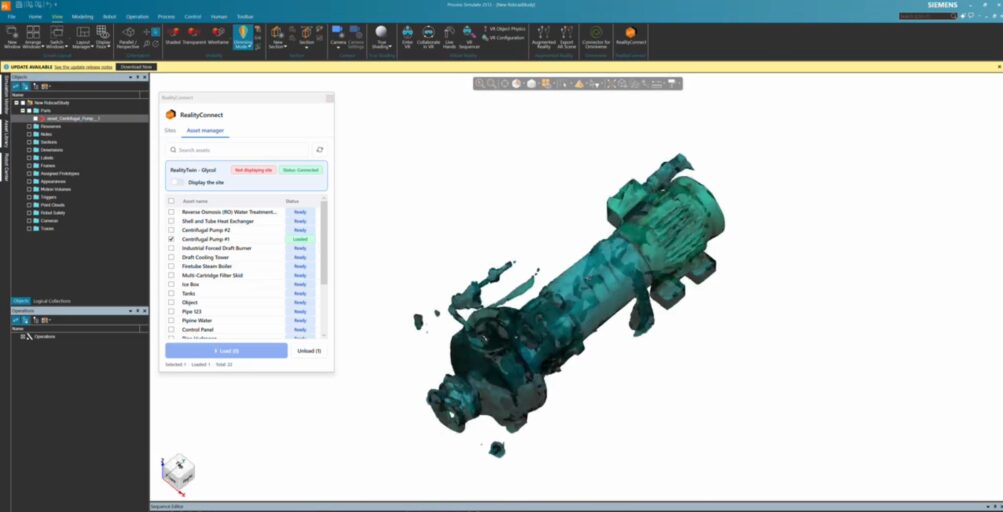
- Navigate the as-built environment as if you were on sit
- Stream precise segmented RealityAssets directly into your simulation workflow
- Use Process Simulate tools to inspect internal components
- Validate process plans and clearances against real conditions
- Start simulation immediately instead of waiting weeks for complete CAD reconstruction
Simulate & Validate Robot Paths Against Real Shop Floor Geometry
Run robot reach studies, path planning, and multi-station process simulations in Tecnomatix Process Simulate against actual as-built obstructions, fixtures, and equipment — not assumptions.
- Detect collisions between robot paths and real physical obstructions before reaching the production floor.
- Validate clearances and assembly sequences against as-built spatial conditions inside Process Simulate software.
- Use Process Simulate tools to inspect internal components and verify spatial constraints against real geometry.
- Eliminate costly line changes and rework by catching process plan issues at the simulation stage.
Commission with Confidence using Siemens PLM & As-Built Context
Run ergonomics studies and assembly sequence validation in real spatial conditions, then integrate with Siemens PLM workflows for end-to-end process planning grounded in as-built reality.
-
Validate every process plan against the factory that actually exists — not a theoretical model or outdated drawing.
-
Integrate as-built reality capture data with existing Siemens PLM and Tecnomatix process planning workflows.
-
Bridge the gap between digital process models and physical plant conditions before commissioning begins.
-
Commission with confidence knowing robot paths, ergonomics, and assembly sequences have been tested against real as-built geometry.
-
Built for your workflow
Tecnomatix Process Simulate Integration for Every Manufacturing Team
From robot simulation to assembly commissioning — see how manufacturing engineers, automation teams, and process planners use the Siemens Tecnomatix Process Simulate plugin to validate processes against real as-built conditions, not assumptions.
Manufacturing & Process Engineers
Import as-built 3D meshes directly into Tecnomatix Process Simulate to validate robot paths, process sequences, and station layouts against real shop floor geometry.
Run multi-station studies with actual spatial data — fewer surprises at commissioning, fewer expensive line changes.
Automation & Robotics Teams
Simulate robot reach, path planning, and collision detection inside Process Simulate using real as-built obstructions and equipment geometry.
No more discovering clearance issues on the production floor — validate everything in the simulation environment first.
Siemens PLM & Digital Manufacturing Teams
Integrate reality capture data with your existing Siemens PLM and Tecnomatix process planning workflows.
Bridge the gap between as-built plant conditions and digital process models — so your process planning reflects the factory that actually exists
Siemens Tecnomatix Process Simulate Plugin FAQ
What does the Siemens Tecnomatix Process Simulate plugin do?
The plugin streams reality capture data — as-built 3D meshes of real shop floor environments — directly into Siemens Tecnomatix Process Simulate software. Manufacturing engineers can simulate robot paths, validate process plans, and run assembly studies against actual facility geometry, without waiting for full CAD reconstruction.
Can I bring an Inventor model into Process Simulate using this plugin?
Yes. The workflow supports importing Inventor model geometry alongside as-built reality capture data into Tecnomatix Process Simulate — giving simulation teams both the designed CAD model and the real spatial context of the facility in one environment.
How does Tecnomatix integrate with Siemens PLM for process planning?
The plugin connects as-built reality capture data to the Tecnomatix Process Simulate environment, which sits within the broader Siemens PLM ecosystem. By importing real facility geometry into Process Simulate, process planners can validate sequences and layouts against as-built conditions — bridging the gap between PLM data and physical plant reality.
What is software for Siemens Tecnomatix and how does Prevu3D connect to it?
Siemens Tecnomatix is a manufacturing process simulation and digital manufacturing software suite. Process Simulate is its core simulation environment for robot programming, assembly planning, and ergonomics. Prevu3D connects to Process Simulate via a native plugin that streams as-built 3D meshes directly into the simulation workspace — no point cloud preprocessing required
What file format does the plugin use to stream data into Process Simulate?
The plugin converts reality capture point clouds into optimized, lightweight 3D meshes that load directly into the Process Simulate environment — eliminating the performance and processing issues associated with raw point cloud data in simulation workflows.


