




NVIDIA Omniverse Plugin for 3D Scanning & Digital Twin Simulation
Digital twin advanced simulation in Omniverse
HQ 3D Assets into Omniverse for Simulation and Digital Twin Development
RealityConnect™ native Omniverse plugin converts reality capture point clouds into high-resolution 3D meshes and simulation-ready assets, then streams them directly into NVIDIA Omniverse.
Deliver Omniverse modeling against existing site conditions
Import Reality Capture Data into NVIDIA Omniverse
Transfer 3D scanned assets, clipping boxes, and segmented scenes from your reality capture environment directly into NVIDIA Omniverse.
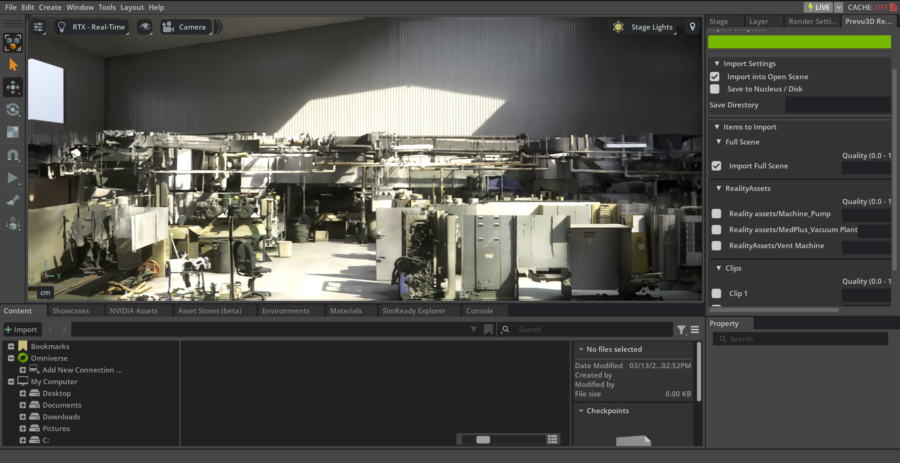
- Import native 3D assets individually or in bulk to accelerate Omniverse project setup.
- Directly integrated with NVIDIA Nucleus for real-time collaboration, scene editing, and simulation workflows.
Simulation-Ready 3D Asset Preparation for Omniverse
Convert reality capture point clouds into high-resolution 3D meshes and textures optimized for Omniverse simulation and digital twin development.
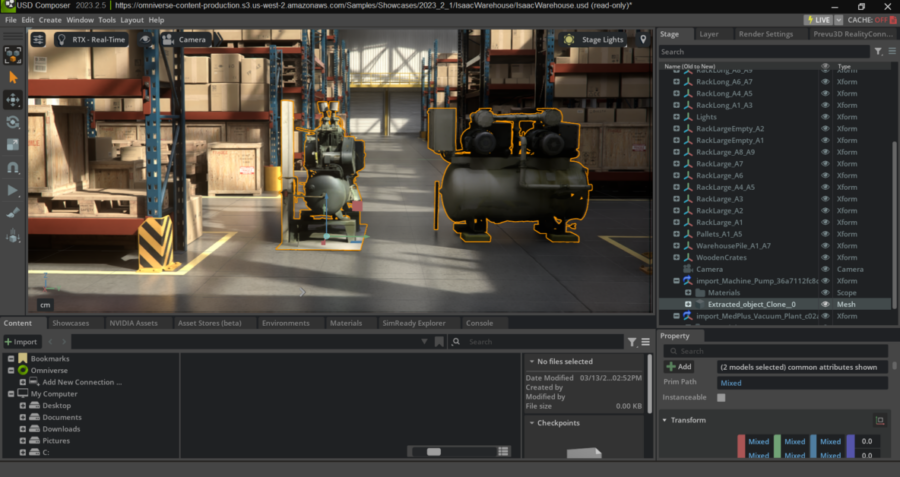
- Bring complex real-world environments into Omniverse as simulation-ready 3D models for virtual testing and facility validation.
- Enable bidirectional workflows for iterative design and validation across Prevu3D and Omniverse.
Omniverse 3D Interoperability for Design and Simulation Teams
Stream 3D scanned assets between Prevu3D and Omniverse to eliminate silos and keep design, engineering, and simulation teams working from the same real-world data.
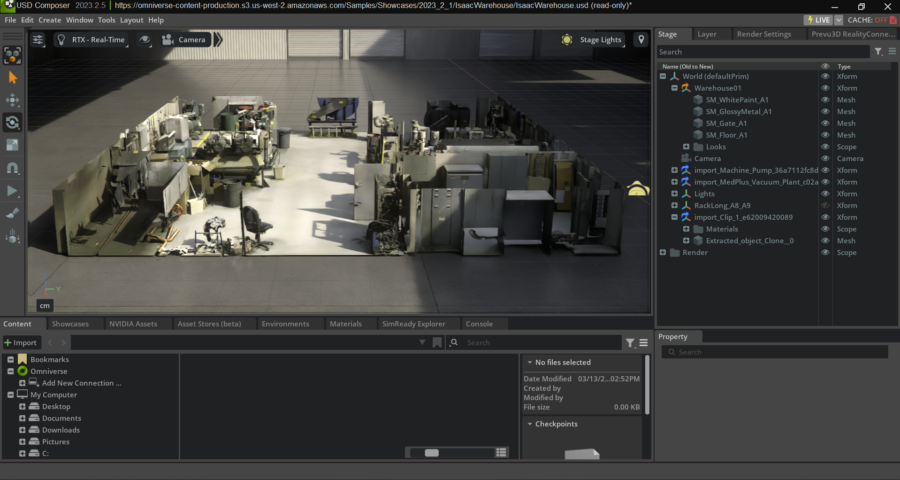
- Facilitate cross-functional collaboration using shared 3D reality assets across design, engineering, and simulation teams.
- Strengthen Omniverse 3D interoperability across simulation workflows — reducing friction and accelerating design validation decisions.
Built for your simulation
From 3D Scanned Assets to Omniverse Simulation — For Every Team
From reality capture to simulation-ready 3D models — see how digital twin developers, industrial engineers, and design teams use the Omniverse plugin to run virtual testing against real as-built environments, without back-modeling.
Digital Twin & Simulation Engineers
Import 3D scanned assets and point clouds directly into NVIDIA Omniverse as simulation-ready meshes.
Run physics-based simulations and virtual testing against real-world facility conditions — no manual re-modeling, no assumptions.
Industrial Design & Process Engineering Teams
Validate factory layouts, process equipment, and plant designs against live as-built 3D data inside Omniverse.
Detect spatial conflicts and clearance issues at the simulation stage — before construction or commissioning begins.
Reality Capture & 3D Scanning Providers
Deliver native 3D assets and Omniverse-ready meshes directly from your point cloud data.
No file conversion, no middleware — give your clients simulation-ready environments they can use in Omniverse from day one.
NVIDIA Omniverse Plugin FAQ
What does the Omniverse plugin actually do?
The native Omniverse plugin connects your reality capture data to NVIDIA Omniverse. It converts point clouds into simulation-ready 3D meshes and streams them directly into your Omniverse environment — so your team can run simulations, validate designs, and develop digital twins against real as-built conditions without any back-modeling.
What types of 3D scanned assets can I import into Omniverse?
You can import RealityAssets, clipping boxes, segmented scenes, and high-resolution 3D meshes individually or in bulk. All assets are optimized for Omniverse simulations and compatible with NVIDIA Nucleus for real-time collaboration.
Do I need to convert files before importing into Omniverse?
No. The plugin handles the conversion from point cloud to Omniverse-ready 3D model natively — no middleware, no manual file conversion, no third-party tools required.
Is this plugin compatible with NVIDIA Omniverse 3D workflows like USD Composer?
Yes. Assets import directly into NVIDIA Omniverse USD Composer and other Omniverse applications. Scenes open ready for editing, simulation, and real-time collaboration across your team.
Can this plugin support digital twin development with NVIDIA Omniverse?
Yes — it’s the primary use case. Import as-built 3D data, prepare simulation-ready environments, and run iterative design validation inside Omniverse. Teams use it for factory layout validation, process equipment simulation, and full facility digital twin development.
What's the difference between this and just importing a point cloud manually?
Manual point cloud imports require significant preprocessing, file conversion, and re-modeling to become simulation-ready. The native Omniverse plugin automates the full pipeline — from raw scan data to Omniverse-ready 3D assets — in a fraction of the time.
Does it work for 3D scanning providers delivering to clients using Omniverse?
Yes. Scanning providers can deliver native Omniverse-ready 3D assets directly from their reality capture data, giving clients simulation-ready environments from day one without additional processing on their end.
Do project stakeholders need a Revit licence to review BIM models?
No. Push your Revit BIM model into RealityPlan™ and share it via web browser with project owners, EPCs, and site teams. Stakeholders can review, annotate, and approve designs in 3D without installing Revit or any other software.