





Convert Point Clouds to 3D Meshes
Transform point clouds into high-quality 3D meshes for richer visual context and insights.
Automate 3d meshing in digital twin
Automatically Convert Point Clouds into Detailed 3D Meshes
RealityPlatform™ allows teams to automatically convert point clouds into detailed 3D meshes, reduce file sizes without losing quality, and gain richer visual insights for better understanding.
Up to 95%
File size reduction
When converting point clouds with Prevu3D's advanced meshing technology.
Over 10 X
Add detailed parameters
Automatically convert massive point clouds into high-quality, detailed meshes.
Accessibility
Filter across systems
Smaller, high-quality mesh files easier to share and review across teams.
Turn raw point cloud data into high-quality, lightweight 3D meshes
Data collection
- Capture detailed 3D data of objects or environments using devices like Terrestrial Laser Scanning (TLS), LiDAR, photogrammetry tools, or SLAM scanners.
- Export the dense point cloud, containing millions of spatial data points, based on your device and software.
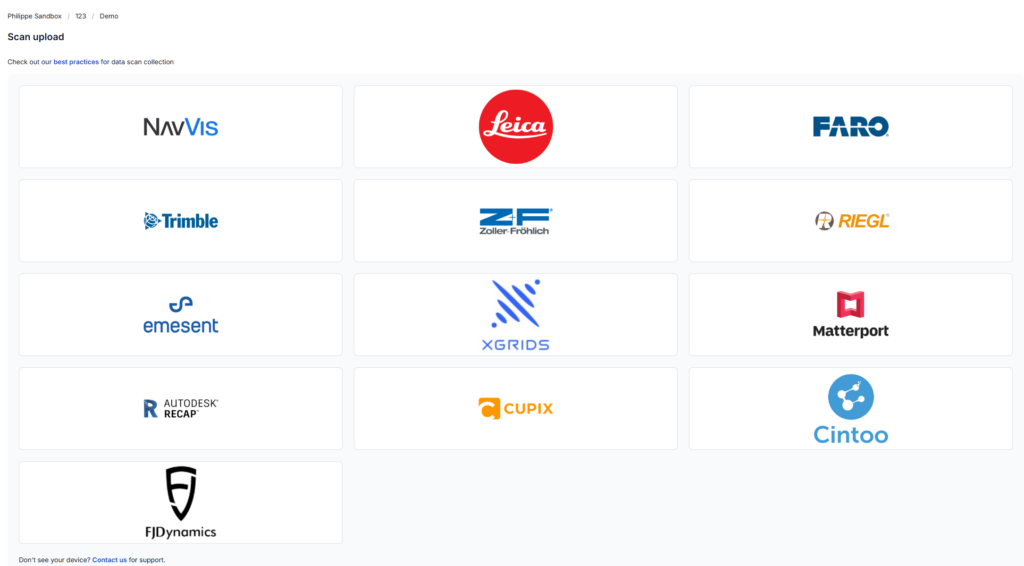
- RealityPlatform supports high-resolution terrestrial scanners using the vendor-neutral E57 file format for point clouds, images, and metadata.

Device-based uploads
- Optimizes workflows for various scanning devices, including traditional scanners and SLAM devices.
- Ensures compatibility and high data quality.
- Requests only essential data like trajectories or scalar fields during uploads.
- Supports expanded file formats for consistent results.
- Enhances reliability and efficiency with a customized pipeline for diverse scanning technologies.
Processing
- View processed files in the Point Cloud Viewer.
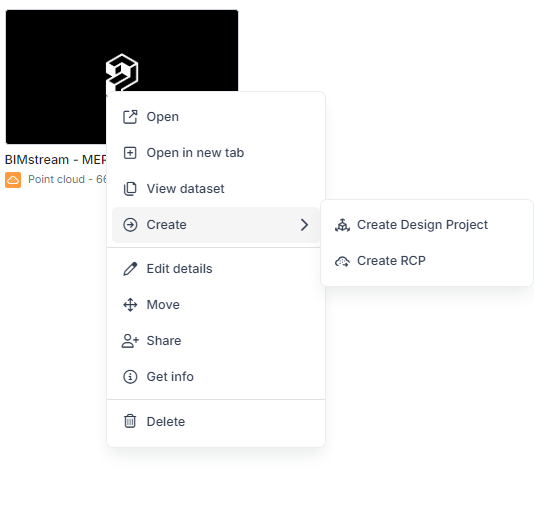
- Export RCP files directly from the Point Cloud card, compatible with CAD software.
- Create Design Project files from point cloud-to-mesh processing in the RealityMesh format, serving as foundational data for projects in RealityPlan.
- Crop specific areas of the point cloud to convert into a mesh for use in design projects.
- Export RealityMesh as OGC (Cesium tiles) for seamless integration with third-party software like Unreal or Unity.
For years, point clouds were unwieldy and couldn’t be utilized by our clients. Prevu3D changes this and enables Ataris to provide revolutionary solutions to our maritime clients.
Read the Case StudySamuel Lee
Managing Director, Ataris