






Siemens Tecnomatix Plant Simulation Facility Stream Plugin
Stream Plant Simulation Using the As-Built Facility Layout
Stream in
simulation
No manual
realignment
No file
conversion
Model material flow against existing site conditions
For material flow and throughput modeling

Let modeling teams work from the latest as-built conditions inside their simulation studies.
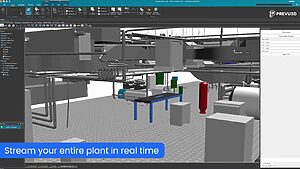
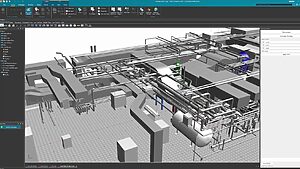
- Stream the full plant layout into Plant Simulation, with no point cloud no files to convert, reference, or re-align
- Your RealityPlatform™ sites are already there, just select one and get started
- Reference multiple lines and sites without swapping a single point cloud in and out
- Keep your SPP file lean by streaming the environment rather than embedding it
Real-world equipment in your object library
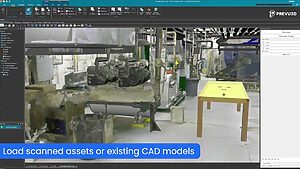
Instead of modeling against generic block geometry, load segmented mesh assets and existing CAD models directly into your Plant Simulation object library. Navigate the plant as if you were on site.
- Load segmented mesh assets into your Plant Simulation object library
- Use sectioning and measurement tools against real-world layout conditions
- Modelbuffers, conveyors, and staging studies against verified plant geometry
- Replace generic library geometry with real equipment representations
Throughput and capacity studies based on reality
Keep capacity logic, cycle times, and flow rules in Plant Simulation. Let the as-built environment provide the spatial context so distance-driven decisions reflect what is actually on the floor.
- Model aisle widths, staging zones and pallet counts, against verified as-built geometry
- Run what-if scenarios on line changes, before you committing to layout or equipment decisions
- Answer layout questions, against the actual space that exists.
- Validate production and logistics in days, not weeks
Built for your workflow
From reality capture to Plant Simulation in three steps
From throughput studies to layout validation and material flow modeling, see how manufacturing engineers, simulation teams, and digital twin leads use Prevu3D to model faster from as-built data inside Plant Simulation.
Manufacturing & Process Engineers
Model material flow and throughput against the real plant layout.
Ground queues, buffers, conveyors, and staging areas are verified in the as-built geometry to reduce assumptions and achieve more accurate results.
Simulation & Digital Twin Teams
Stop managing point cloudfile exports and coordinate offsets across global sites.
Align once in the Prevu3D platform.
Stream the facility twin into every study.
Scanner & Survey Firms
Deliver reality capture data directly into client Plant Simulation environments, with no file conversion, no middleware and faster as-built handoff on every project.
Siemens Tecnomatix Plant Simulation Plugin FAQ
Does the Plant Simulation plugin support multiple production lines or sites at once?
Yes. Because the environment is streamed from RealityPlatform rather than embedded as a single referenced point cloudfile, you can work across multiple lines and sites without swapping point clouds in and out.
How do I stream a point cloud into Siemens Plant Simulation?
Install RealityConnect, connect to your RealityPlatform account, and select a site from the tree. The composed plant layout streams directly into Plant Simulation — no point cloud export, with no manual coordinate offset required.
Can I load scanned equipment into my Plant Simulation object library?
Yes. You can load segmented mesh assets from RealityPlatform into your Plant Simulation object library, so you can model with real equipment geometry instead of generic block representations, leveraging JT export as needed.
What scan formats does RealityPlatform support?
RealityPlatform ingests data from terrestrial laser scanners, SLAM and mobile devices, drones, and 360° video. Most common scan formats are supported. Contact us for a full list of supported inputs.
Does this replace Plant Simulation modeling?
No. RealityConnect provides the as-built spatial context — the real plant layout, distances, and equipment positions. All simulation logic, cycle times, capacity rules, and flow definitions stay in Plant Simulation.
Do I need to re-export a PD file every time a scan is updated?
No. Updates are managed in Reality Composer. When you publish a new composition, any study loading that site automatically reflects the latest as-built conditions — no re-export or manual re-alignment needed.
Is this plugin compatible with both Plant Simulation and Process Simulate?
RealityConnect is available for both. Plant Simulation is focused on material flow, throughput, and capacity modeling. Process Simulate covers robotics, ergonomics, and commissioning. Each plugin is optimized for its respective workflow.