

Blog - December 5, 2025
RealityConnect for Revit Demo – Stream Real Conditions Into Revit
BRING REAL-WORLD CONDITIONS DIRECTLY INTO REVIT
Watch the Full Demo: RealityConnect™ for Revit
Solving Revit’s Biggest Reality Capture Bottleneck
Revit users repeatedly face the same bottleneck: reality capture data is valuable, but getting it inside Revit—accurately, efficiently, and without heavy imports—has historically been painful.
The latest RealityConnect™ for Revit releases change that. Instead of forcing teams to wrangle massive point clouds, navigate format constraints, or remodel from scratch, Prevu3D streams a ready-to-use visual environment and structured assets directly from the cloud into Revit.
Jay Ure, Director of Customer Success, summarized the shift clearly at the start of the session:
Revit users need a clean, reliable path for captured reality to produce ready BIM models with speed, certainty, and coordination.
This demo introduces two connected capabilities:
-
RealityConnect™ 25.11, which syncs RealityPlan™ outputs into Revit
-
RealityConnect™ 26.1, a major evolution that streams visual context straight from RealityTwin™
The next generation of RealityConnect™ for Revit
Streaming Multi-Layer Mesh Compositions
The session began with a walkthrough of RealityTwin™’s multi-scan compositions—TLS, SLAM, drone LiDAR, and satellite data layered into a single, coherent environment. RealityConnect™ 26.1 streams this composition straight into Revit, with dynamic Level of Detail adjusting to the user’s camera and performance requirements.
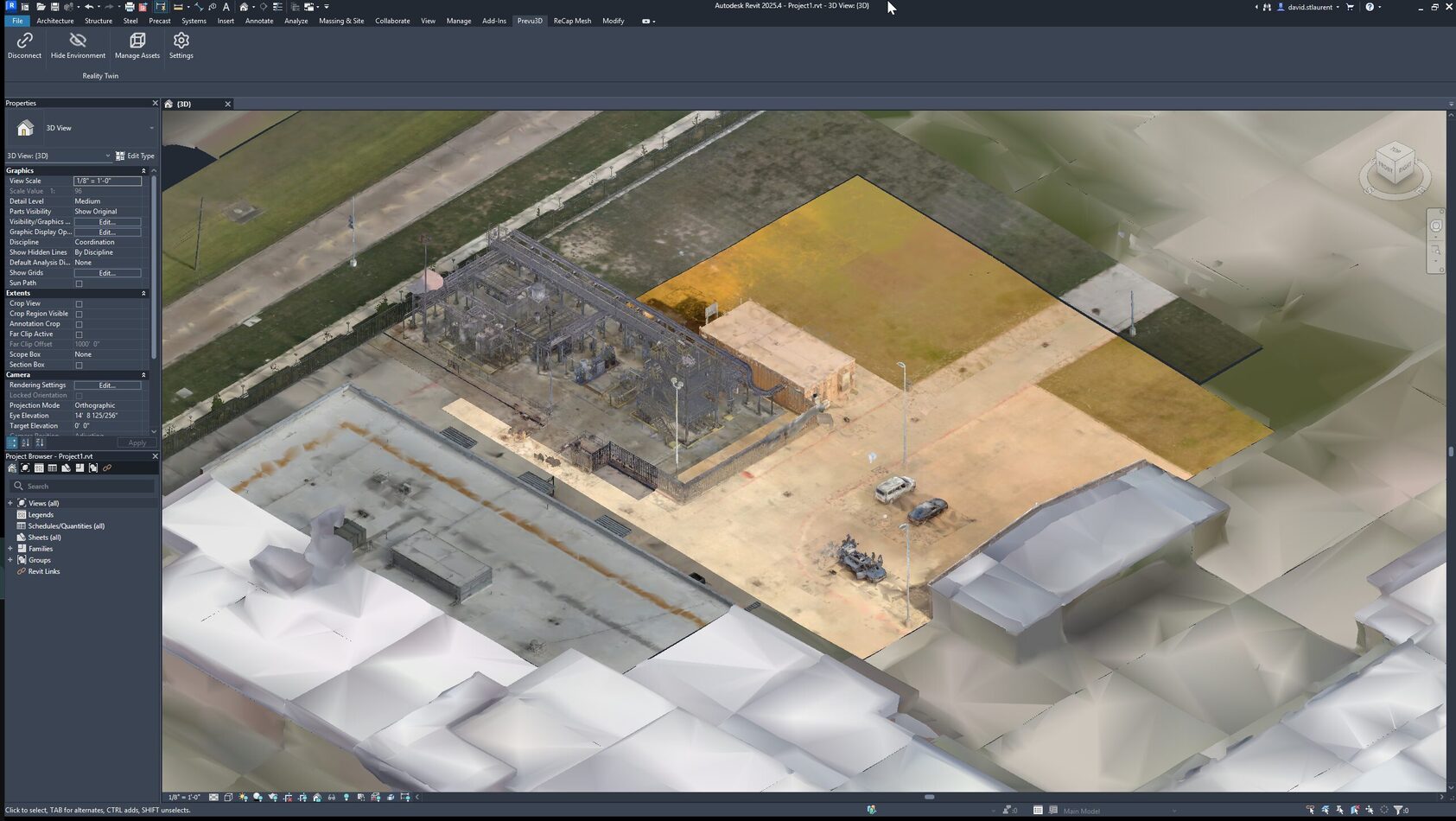 RealityConnect™ for Revit streams multi-layer visual context—TLS, SLAM, drone LiDAR—directly into your Revit project.
David St-Laurent, Senior Customer Success Manager, demonstrated how even massive environments stay fluid:
It’s dynamically streaming from RealityTwin… the level of detail adapts to the camera’s point of view, so navigation stays smooth—even in dense mechanical areas.
For BIM teams, this means real-world context—accurate, navigable, and instantly accessible—appears in Revit without preprocessing steps or format juggling.
Loading Structured RealityAssets™
Beyond the environment itself, RealityConnect™ lets users load precise, pre-oriented assets defined in RealityTwin™. These aren’t generic objects—they’re segmented, spatially aligned, reality-based components.
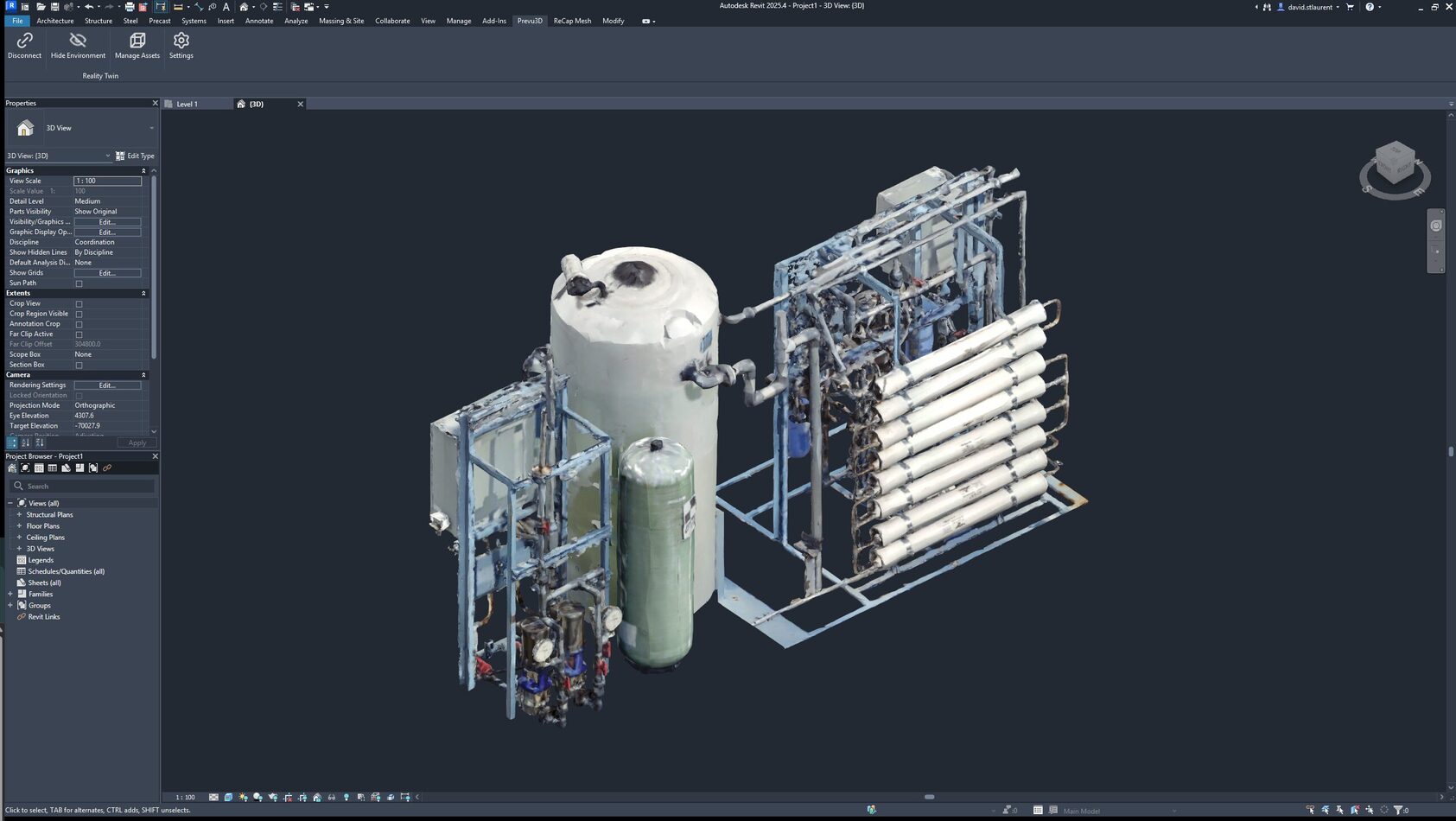 From scan to a reusable Revit family—RealityConnect™ for Revit streams real-world assets directly into your model with accurate placement and geometry.
Once loaded, assets behave like native Revit elements. They can support high-detail visualization, baked-geometry modes for lightweight collaboration, or be exported as Revit families for reuse across projects.
Combined with shared coordinates, there’s no guesswork:
This asset is exactly the one we defined in RealityTwin… the placement is predictable and accurate. —David St-Laurent
Combining CAD and Reality Capture without Friction
One of the most compelling sections of the demo showed CAD integrated directly with live mesh context. In the example, an air compressor missing from the original CAD was visible in the scan, instantly loadable as an asset, and inserted into Revit for accurate back-modeling.
It illustrates a universal pain point: the as-designed world seldom matches the as-built world. Instead of chasing vendor models or manually reconstructing missing geometry, teams can directly reference the real thing.
Jay put it well: “A simple LiDAR scan brings a great deal of value… either for context or the ability to refabricate existing equipment that currently exists in the field.”
Why Prevu3D is Different
Digital twin platforms often stop at visualization. Prevu3D goes further, combining real-world fidelity with a workflow that’s built for actual engineering use:
- Experience-First Visual Twins
Prevu3D prioritizes visual quality and usability—delivering mesh-first, immersive context rather than point-cloud clutter. Teams get an environment that feels like being on site, improving orientation, asset selection, and decision speed.
- Truth Creation Through Integrated Data Processing
Prevu3D isn’t just a viewer. It converts raw point clouds, imagery, and other inputs into high-quality meshes validated for engineering workflows. This is especially critical when bringing those assets into Revit with centimeter-level accuracy.
- API-Driven Integration for Enterprise Workflows
RealityConnect™ isn’t a closed plugin—it’s part of an API-first ecosystem connecting RealityTwin™ to tools like Revit, Inventor, SAP, Maximo, and more. The result: the visual twin becomes a strategic backbone, not another siloed system.
These differentiators matter because teams need more than a picture of reality—they need trustworthy, operationally useful reality that plugs into their existing workflows.
What Teams Saw in The Live Demo
✔ Dynamic streaming of multi-layer mesh compositions into Revit
✔ Adjustable resolution and performance budgets for smoother navigation
✔ Instant access to structured RealityAssets™
✔ Asset-level placement with perfect shared-coordinate alignment
✔ CAD + reality side-by-side for back-modeling and validation
✔ Export of real-world geometry as reusable Revit families
✔ Pathway to ACC-friendly workflows through baked-geometry modes
Despite the bandwidth hiccups (always a risk with live streaming), the capabilities were clear: RealityConnect™ is evolving into a high-performance, future-ready bridge between the real world and BIM workflows.
See How It Works in Your Own Workflow
Want to bring real-world conditions directly into Revit and eliminate remodeling guesswork?
Keep learning with us—subscribe on YouTube channel and follow Prevu3D on LinkedIn for the latest in digital transformation and operational intelligence