
Context: Engineering Assessment
digital twin case studies
Streamlining Structural As-Built Modeling with Prevu3D
Learn how Tetra Tech cut modeling time by 97% with Prevu3D, creating high-fidelity mesh assets for Revit to boost accuracy and project efficiency.
Unlock Case Study
the challenge
Without 3D Digital Twin in Infrastructure Engineering
- No existing architectural or structural base model (brownfield conditions)
- Highly irregular geometry difficult to model manually
- Heavy reliance on point clouds requiring manual tracing in Revit
- 60 hours of manual modeling effort
- Limited documentation and reference data
- Risk of inaccuracies in manual reconstruction
the benefits
3D Digital Twin and Laser Scanning in Infrastructure Engineering
- Reduced Revit modeling time from ~60 hours to near-zero manual effort
- Direct import of scan-based mesh as editable BIM components
- Improved modeling accuracy and geometric fidelity
- Eliminated manual tracing over point clouds
- Faster workflow from reality capture to design environment
- Centralized visualization and processing of scan data
- Enabled engineers to focus on analysis and design instead of modeling
- Improved collaboration through shareable, ready-to-use assets
Get Instant Free Access to the Streamlining Structural As-Built Modeling with Prevu3D case study
Capturing Complex Existing Conditions for Structural Analysis
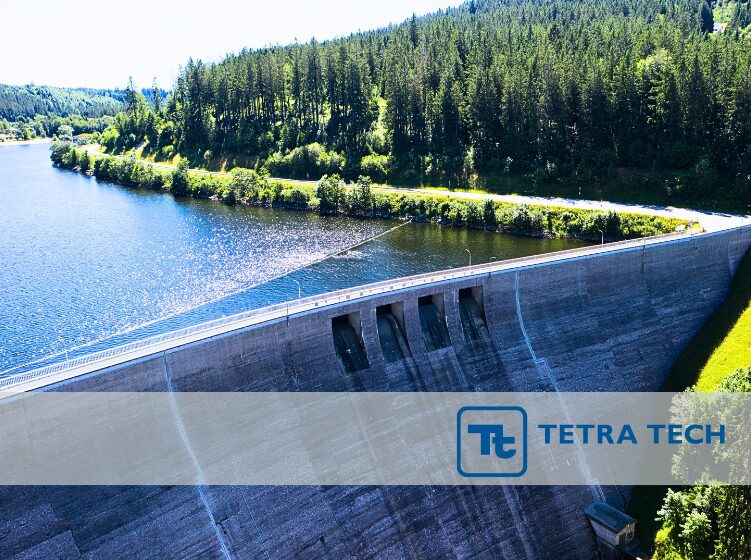
As part of a reservoir restoration project, Tetra Tech was tasked with documenting and analyzing a complex rock wall structure showing signs of degradation.
Due to the irregular geometry and extent of damage, the team required a precise as-is model to perform structural assessments and plan reinforcements.
The Challenge: Manual Revit Modeling of Irregular Geometry Without Reference Data
Reconstructing the wall manually in Revit was initially estimated at 60 hours, given the lack of architectural references and the need to model every detail from scratch.
The absence of a base model (architectural or structural shell) added to the complexity, especially in a brownfield context with limited design documentation.
The Solution: Converting Scan Data into BIM-Ready Assets with Prevu3D
Prevu3D’s visual twin platform enabled the engineering team at Tetra Tech to turn scan data into editable 3D assets ready for CAD and BIM environments. For this project, the team used:
- RealityPlatform to centralize and visualize high-resolution scan data (point clouds and meshes) in the cloud.
- RealityPlan to crop and process the scan area specific to the damaged rock face.
- RealityConnect for Revit to import the meshed geometry directly into the Revit environment as editable native components—eliminating the need to manually trace over point clouds.
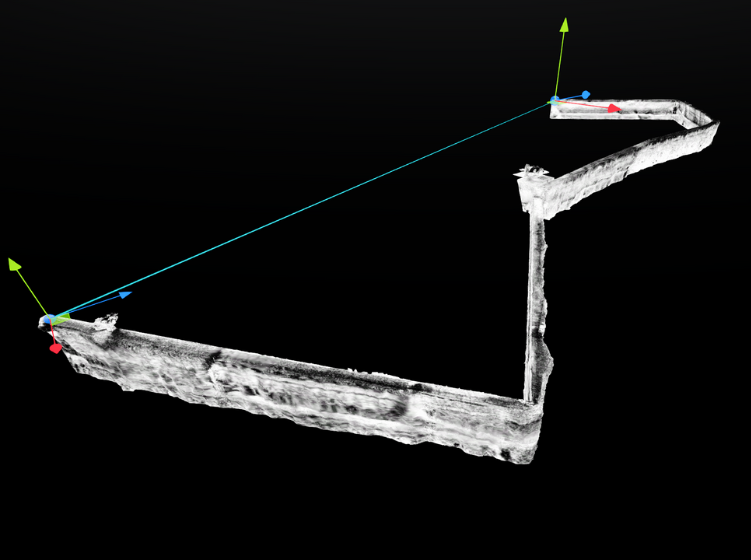
Mesh of the scanned rock wall, displayed with vertical axis arrows for modeling orientation inside Prevu3D. This mesh was imported directly into Revit using RealityConnect, streamlining the structural modeling process.
From Reality Capture to Revit Workflow Integration
In this project, the Tetra Tech team implemented a structured workflow between Prevu3D RealityPlatform, Prevu3D RealityPlan, and Autodesk Revit to maximize accuracy and reduce manual modeling time:
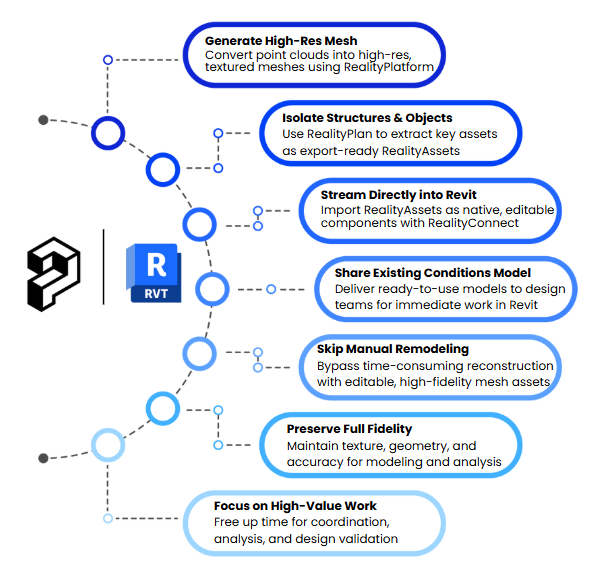
- Generate High-Res Mesh from Point Clouds
Transform reality capture point cloud data into high-resolution, textured mesh models using Prevu3D RealityPlatform, our cloud-based processing and visualization tool. - Isolate Structures & Objects
Quickly isolate assets like a degraded rock wall using tools such as the AI Magic Wand, Bounding Box, and Turntable in RealityPlan. Outputs are packaged as RealityAssets for precise, export-ready modeling. - Stream Directly into Revit
Bring RealityAssets into Revit as native, editable components—eliminating manual tracing and accelerating design workflows using the RealityConnect for Revit plugin. - Instantly Share the Existing Conditions Model
The RealityAsset generated in RealityPlan was shared with the design team as the initial working model—fully prepared for immediate use in Revit. - Eliminate Time-Consuming Manual Remodeling
This process eliminated time-consuming Revit reconstruction by importing complex geometry as editable RealityAssets. - Deliver True Visual and Structural Fidelity
The imported mesh preserved full texture, geometry, and visual fidelity, providing a precise, editable reference for modeling and structural analysis. - Focus on High-Value Tasks
By automating existing-conditions modeling, the team redirected efforts toward analysis, coordination, and design validation to maximize project value.
This structured approach eliminates redundant remodeling efforts and enables rapid asset reuse with improved project consistency.
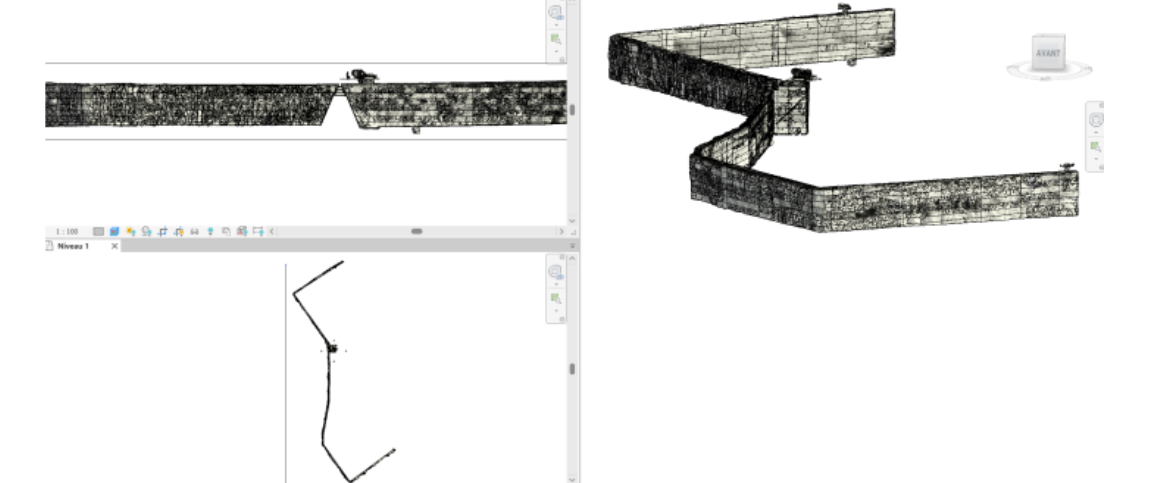
Meshed RealityAsset imported into Revit: This view showcases a textured mesh generated from 3D scan data, seamlessly integrated into Revit for enhanced design and coordination workflows.
The Results: Reducing Modeling Time by 97% with Automated Scan-to-BIM
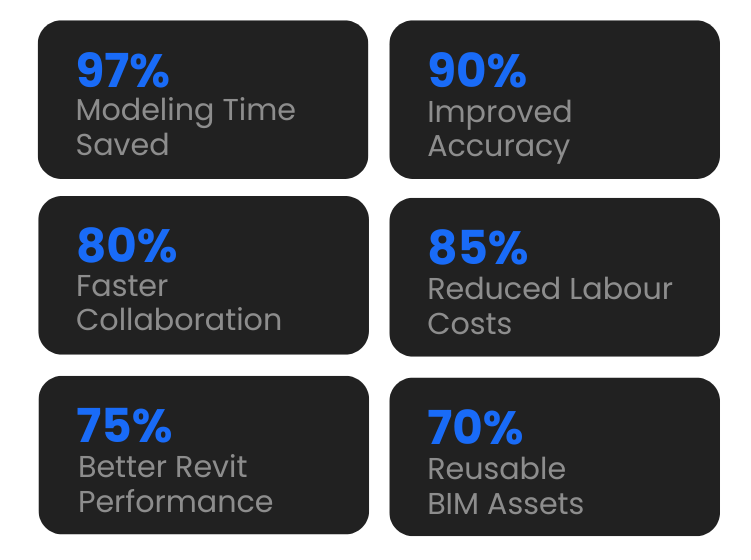
Using Prevu3D’s tools, the wall was meshed in just 2 hours—a 97% time reduction compared to manual modeling estimates. The mesh served as a high-fidelity reference for design validation and structural assessment, eliminating unnecessary field revisits and resource bottlenecks.
The ability to quickly convert scan data into an accurate model not only reduced labor time but also improved precision, ensuring a more reliable structural assessment.
— Tetra Tech Design Team
Key Metrics from Prevu3D Integration on Reservoir Restoration Project
Value & Insights
- Massive Time Savings: Reduced modeling from 60 hours of manual work to 2 hours of fully automated meshing—with no human interaction required.
- High Accuracy: Mesh-based modeling improved geometric fidelity in a context where precision directly impacts structural evaluation.
Reduced Labor Costs: Avoided the need for full remodeling by high-cost BIM resources. - Cloud Collaboration: Teams used Autodesk Construction Cloud to work from a shared model without loading massive point cloud files locally.
Optimized Revit Performance: Lightweight RealityAssets minimized project file size and prevented Revit crashes or long load times. - Flexible Asset Reuse: Imported geometry was reclassified and augmented in Revit for future engineering use, with connectors added for integration with MEP systems.
about The partner
Tetra Tech
Tetra Tech is a global leader in engineering and consulting, delivering innovative solutions in the fields of environment, infrastructure, water, energy, and resource management. In Quebec, its Operations Technology & Innovation department leverages advanced digital tools like Prevu3D to streamline project workflows and improve modeling accuracy across disciplines.
about us
Prevu3D
Prevu3D, a Montreal-based tech company founded in 2017, is dedicated to leveraging the physical world to drive work efficiency and innovation. Our intuitive software solution bridges reality to the digital world, offering the most accurate representation of facilities for engineering, maintenance and operational needs.


